
Generative AI has moved from novelty to necessity inside a single year. McKinsey's Q1 2026 research put the number at 65% of organizations now using generative AI in at least one business function, nearly double what it was just ten months prior.
Stanford's 2026 AI Index Report adds a sharper detail: professionals with verified AI skills are pulling in a wage premium of 62%, a jump from previous years. So if you've been putting off learning Claude AI, the numbers suggest that's getting harder to justify. Here's how to actually go from opening the app for the first time to using it like someone who knows what they're doing.
What is Claude?
Claude is Anthropic's family of large language models, built for reasoning, writing, coding, and working through multi-step problems. It's not just a chatbot that answers trivia. It holds up under long documents, technical requests, and tasks that need several steps done in the right order. As generative AI spreads into marketing, engineering, and operations teams,
Claude has become one of the go-to AI tools for people who need output they can actually rely on, not just something that sounds plausible. Getting a real feel for what Claude can and can't do is really the starting point for how to learn Claude, because everything else you pick up builds on that.
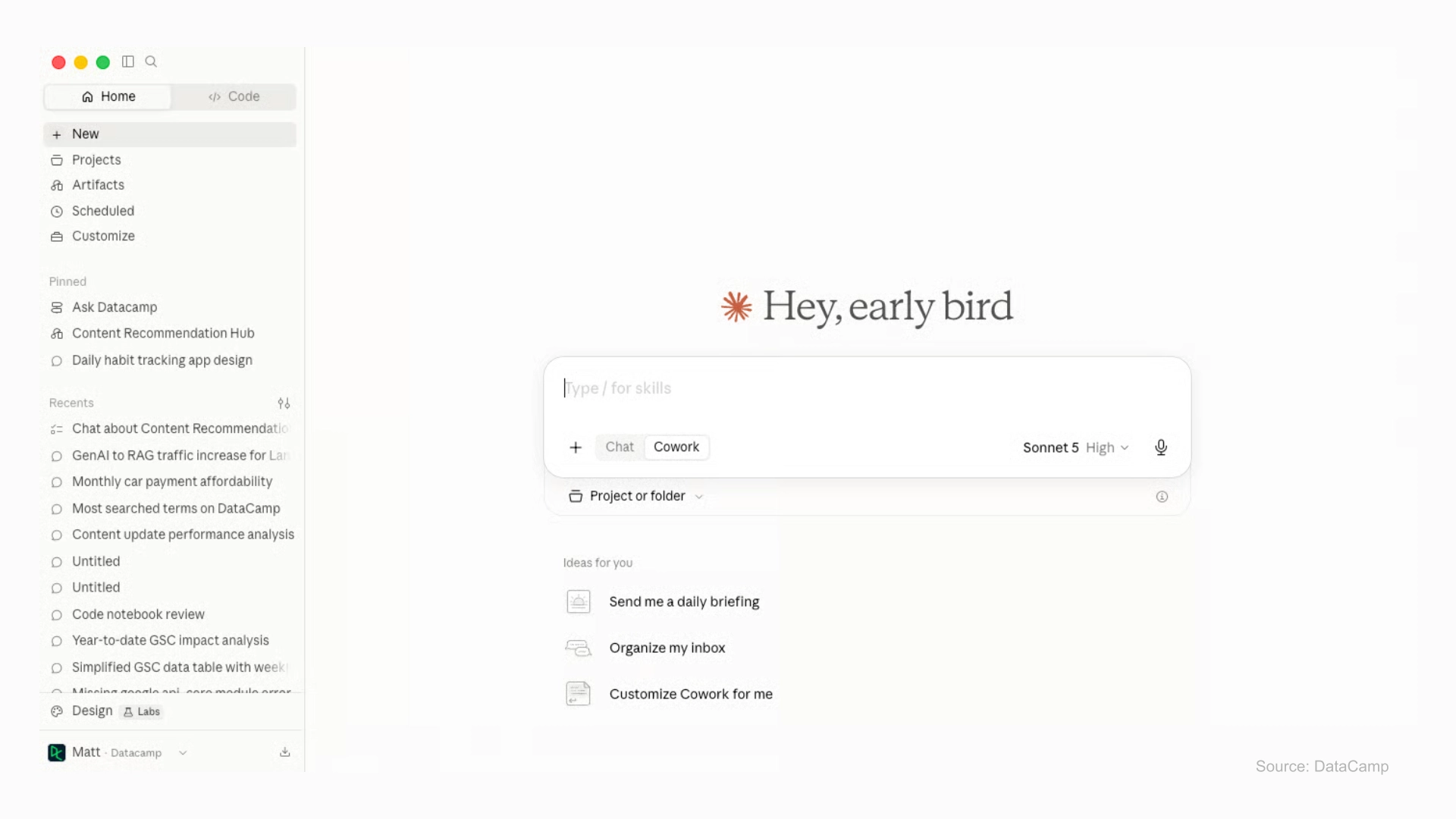
What Are Claude's Different Models and Modes?
When you first open Claude, you'll see a model picker, but it may not be immediately clear what each option does. Claude has several versions, and each one is designed for different types of tasks:
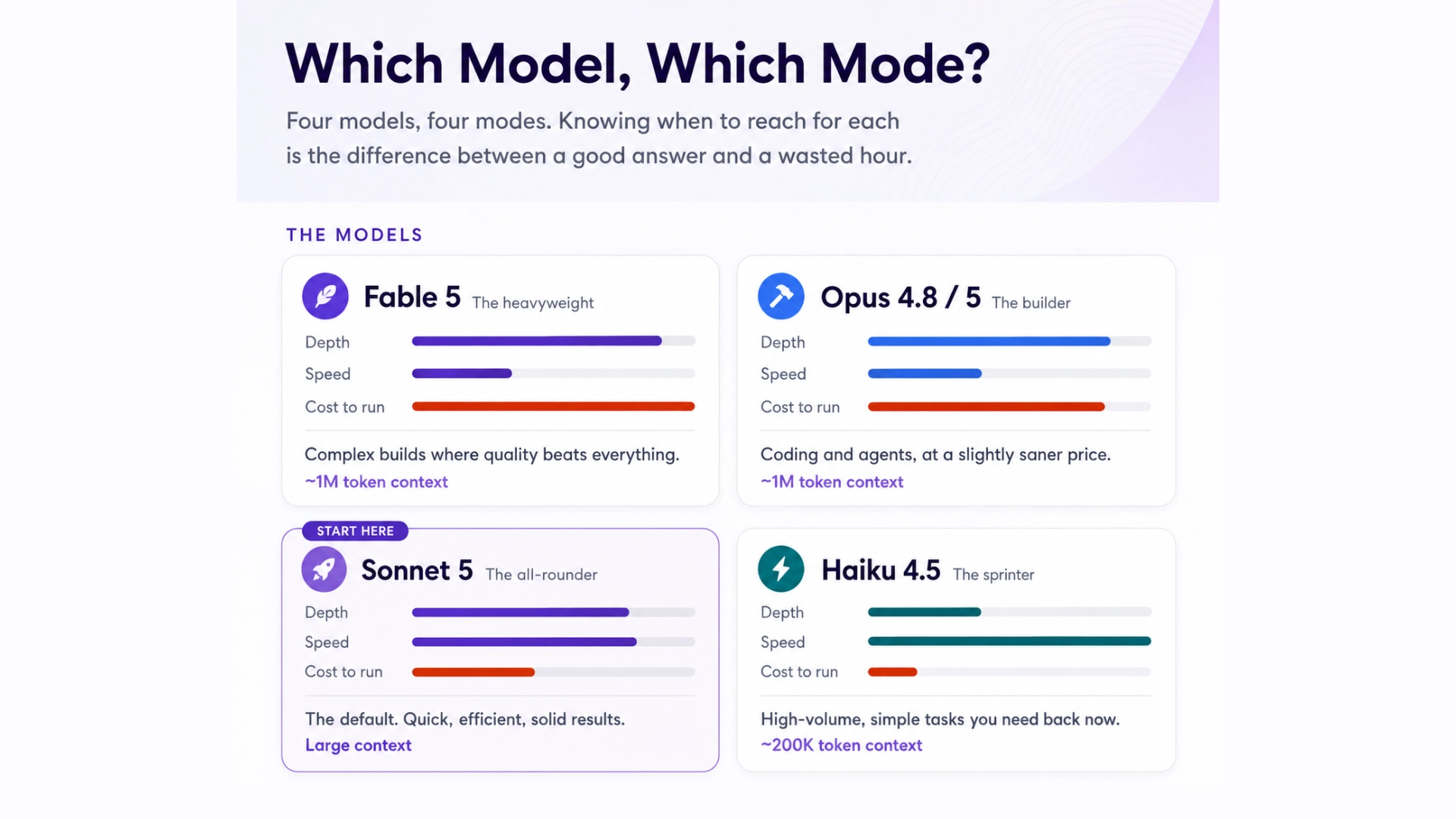
Picking the right one for the job is part of learning how to use Claude well, and most beginners do fine sticking with Sonnet 5 as the default until a task demands more power from Opus or Fable.
Claude also isn't a single interface. It runs across a few distinct modes built for different jobs:
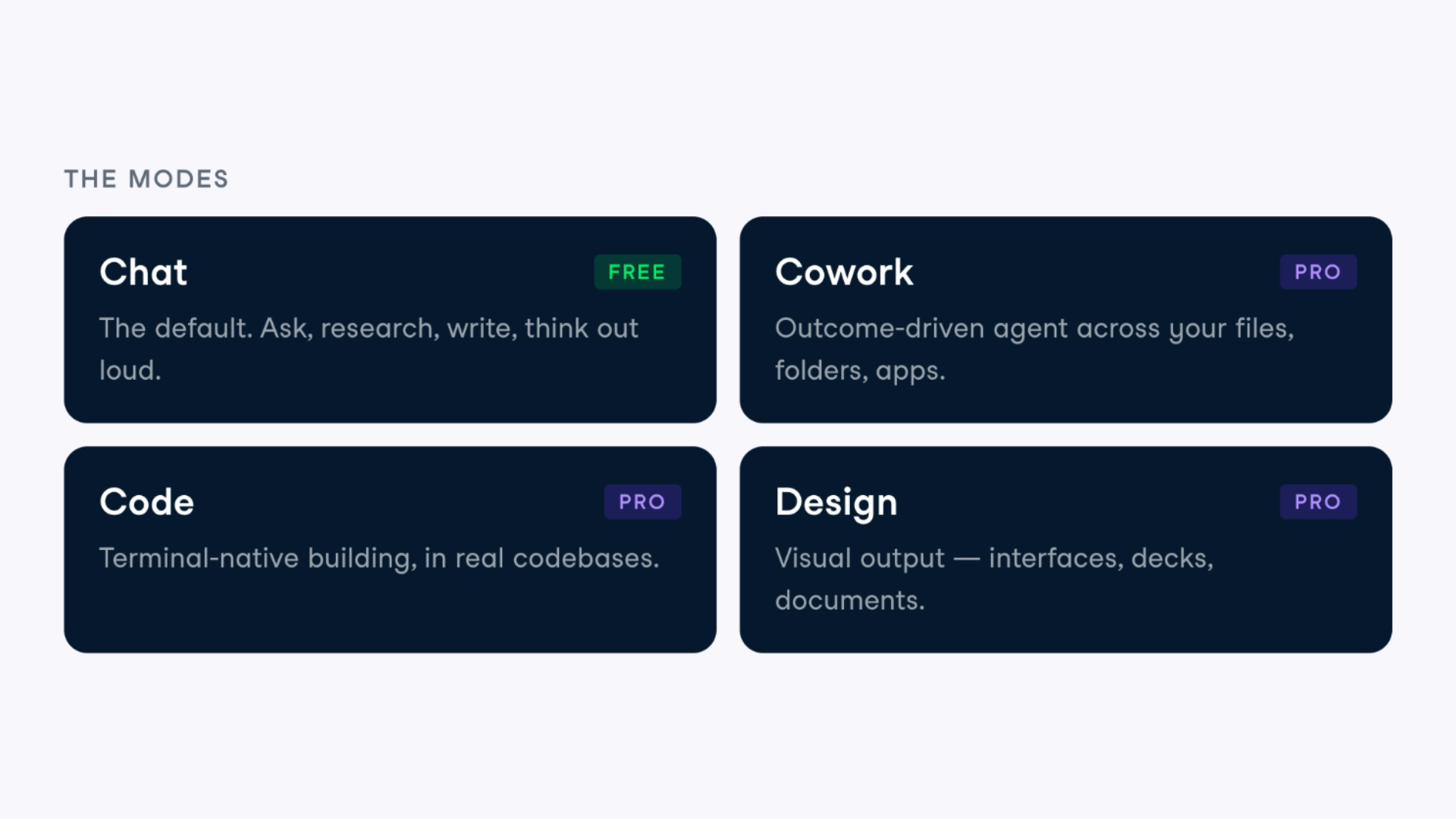
Knowing which mode fits which task saves a lot of trial and error early on, and it's one of the clearer signs of moving from a casual user to someone with real Claude skills.
How Should a Beginner Actually Get Started?
Skip the tutorials for a minute and just open the tool. That's genuinely the fastest way into a Claude AI tutorial mindset, hands-on trial beats passive reading every time. Start with the standard web interface and get a feel for how a conversation flows before chasing advanced features. A sensible first pass looks something like this:
Most people who feel stuck with Claude for beginners content aren't actually struggling with the tool. They're struggling with how they're asking for things. Which brings us to the next part.
What does it actually take to build a career as an LLM engineer in 2026? USAII®’s guide walks through the skills, tools, and milestones that matter for LLM engineering roles, including exactly where Claude fits into a working technical stack: How to Build a Career as an LLM Engineer in 2026 →
What Does Good Claude Prompting Actually Look Like?
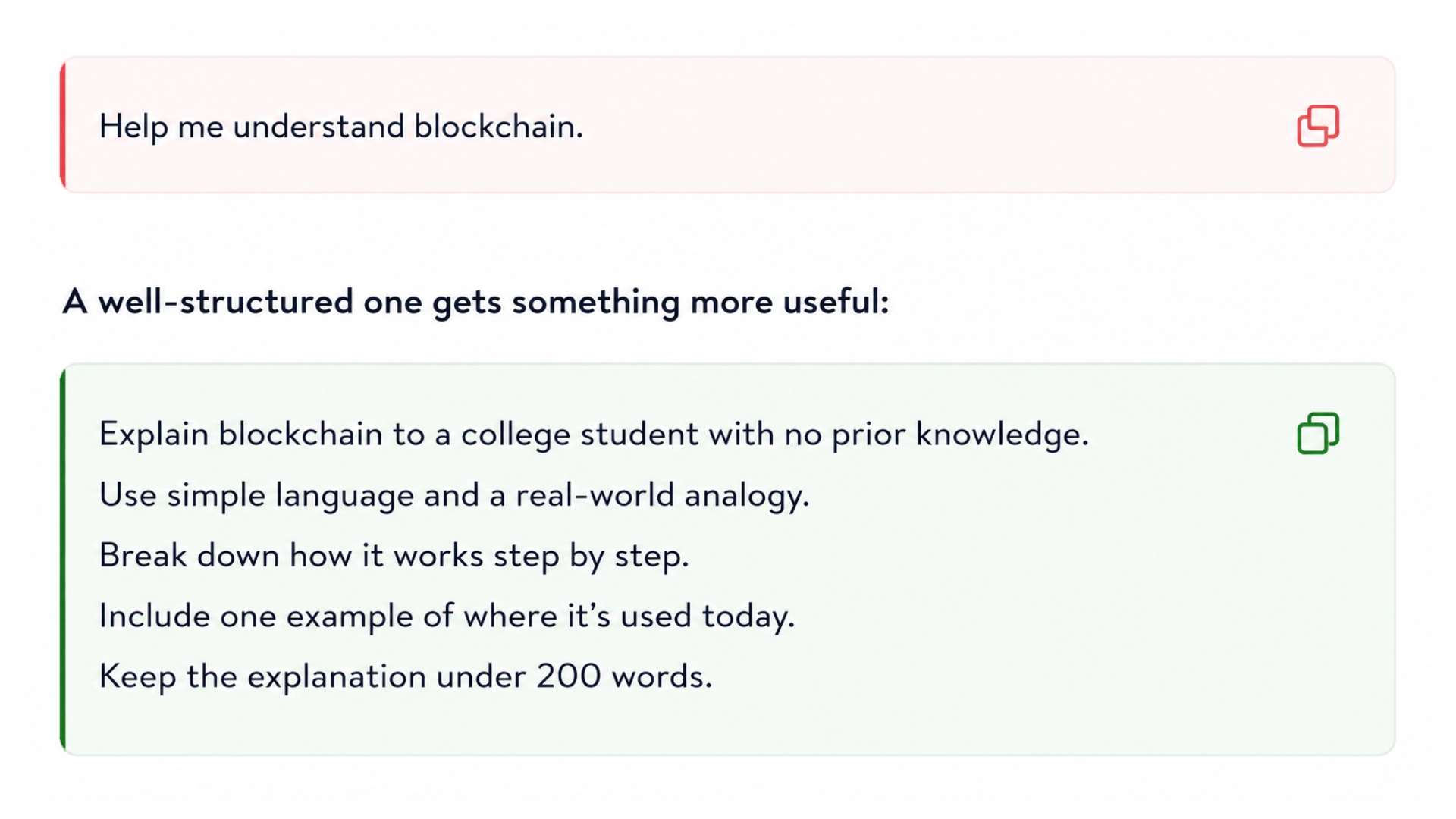
Claude prompting is its own skill, and it's what separates someone who uses Claude occasionally from someone who gets consistently useful results. Good prompting comes down to giving Claude enough context, being clear about the format you want back, and breaking bigger tasks into smaller pieces instead of asking for everything at once. People who develop real Claude skills tend to lean on a handful of habits:
This is also where structured Claude training starts to pay off. Self-taught prompting habits tend to plateau without someone or something pointing out what you're missing.
What Does the Jump From Beginner to Pro Look Like?
Getting past the basics means spending real time with Claude's more advanced side, especially Claude Code if you're working in a technical role. At this stage, the focus shifts toward:
The point here isn't collecting more prompts. It's figuring out how Claude actually slots into your broader AI workflows, so speed and quality improve at the same time instead of trading off against each other. Somewhere around here, a self-taught user starts looking a lot like a trained AI and ML engineer.
How Long Does It Actually Take to Learn Claude?
There is no standard timeline on how long it takes to learn Claude but a simple roadmap can help set expectations. You can start getting useful results from Claude after just one afternoon of experimenting, especially with basic research and writing. Becoming truly comfortable with it, where you can write effective prompts without constantly second-guessing yourself, usually takes about four to six weeks of regular use.
If you want to go further with Claude Code, APIs, and connected workflows, expect to spend around two to three months learning and practicing as there will always be new features and techniques to explore.
What matters most is consistency. Short, regular practice sessions using real work are much more effective than occasional long sessions without a clear purpose.
Does Formal Claude Training Actually Change Career Outcomes?
Self-study can get you part of the way, but structured learning can help you build the depth and confidence that trial and error often misses. The USAII® Certified AI Engineer (CAIE™) program takes you beyond simply learning how to use tools like Claude by building a stronger understanding of AI engineering fundamentals, LLMs, model development, deployment, evaluation, and responsible AI practices.
That foundation helps you understand not just *what* an AI tool can do, but *how and why* it works and where it fits into real-world AI systems. For professionals looking to move toward AI engineering or LLM-focused roles, the CAIE® program provides a structured pathway to develop and demonstrate that broader technical capability.
Turning Claude Skills Into Real AI Upskilling
Once the fundamentals are solid, the value shows up in application. Use Claude for drafting content, generating code, handling customer interactions, or working through data-heavy analysis, these line up with the top use cases enterprises are actually investing in through 2026. Treat every project as another rep toward AI upskilling, and write down what worked so the skill compounds instead of resetting every time a new model ships.
Build a Career Around These Skills
Learning Claude means the most when it's tied to an actual career direction, not just a stack of prompts. Thinking about moving into AI from a different field altogether? USAII®’s guide covers the practical steps for that transition, including certifications, skill-building, and how to position yourself for AI roles in 2026 Download the guide →
Claude isn't a niche tool for early adopters anymore. It's turning into core infrastructure for how people actually work, write, and build things. With the right practice, Claude can go from something you use to something that fundamentally changes how you work.